


CLZ Music, CD/vinyl collection
4.7445.00 Reviews
App Specs
- Version
- 11.1.3
- Updated On
- License
- Free
- Downloads
- 100,000+
- Developer
- CLZ
- Categories
- Music & Audio
- Platform
- Android
Screenshots
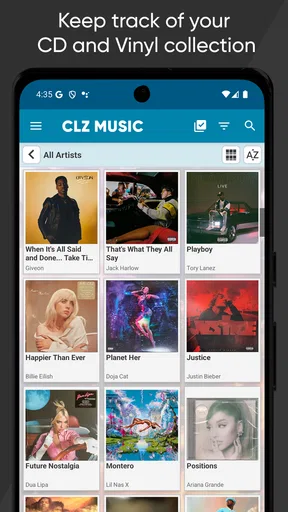
 Analysis by AppCompare
I have always found physical music collections harder to manage than they look. A few shelves of CDs or records can feel perfectly organized until I want to check whether I already own an album, remember which edition I have, or make a shopping decision while standing in a record store. CLZ Music is built around solving that specific problem: it turns a physical music library into a searchable catalog, with barcode scanning doing most of the initial entry work.
That focus is what makes this Music & Audio app interesting. It is not trying to replace a streaming service, act as a digital player, or become another social music feed. The useful question is much simpler: can it help me keep a reliable inventory of albums I own? In my experience, the answer is yes, especially when the collection is large enough that memory and handwritten lists stop being dependable.
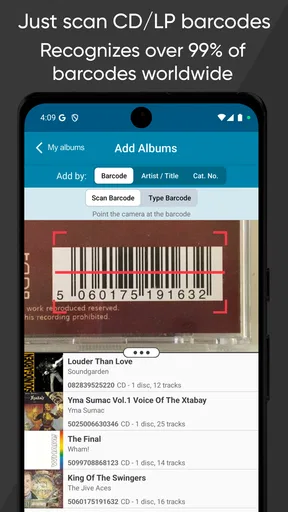
The central strength is the barcode-based cataloging workflow. Instead of typing every album title, artist, and release detail from scratch, I can use the physical barcode as the starting point. That makes the difference between a collection I actually maintain and one I abandon after entering a dozen records. The app is free to install, rated for Everyone, and developed by CLZ. Its current version is 11.1.3, with support beginning at Android 6.0.
Why barcode cataloging changes the job
The obvious appeal of scanning is speed, but the more important benefit is consistency. Manual entry encourages shortcuts: I might type only the artist and album name, forget a disc count, or use slightly different spellings for the same performer. A barcode-led process gives each item a more structured starting point, which makes later searching and browsing more useful.
This matters most when I am dealing with shelves that contain similar-looking releases. The same album may exist as a standard CD, a deluxe package, a reissue, or a different regional pressing. A simple note in my phone may tell me that I own the album, but it often does not help me remember which physical version is actually at home. A catalog is more valuable when it helps answer that second question.
I also like the psychological effect of scanning. Adding one album feels like a small task, while building a collection manually feels like a project with no clear end. I can work through one shelf, one box, or one shopping bag without needing to prepare a spreadsheet first. That makes the app practical for gradual cataloging rather than something that only works if I am willing to dedicate an entire weekend.
There is an important distinction, though. A barcode is a useful identification tool, not a guarantee that every collectible detail will be captured exactly as I would describe it. Serious collectors may care about matrix information, pressing variations, signatures, condition, or packaging differences. I would treat the scan as the foundation of the record and then review or refine the entry when the physical edition matters.
Worth Reading Before You Choose

Baby Panda World Brings Quick Play to Modern Phones, but Its Game Library Feels Busy

ESPN’s Live Game View Makes Following Close Games Easier

QuizzLand Review: A Good Fit for Short Trivia Breaks, Not Every Player

Basketball Stars: Multiplayer Is Fast, but Can It Recover When Matches Go Wrong?

WEBTOON Turns Phone Updates Into a Better Reading Routine

Link to Windows Runs on Shared Habits, Not Social Feeds
From a shelf to a usable personal database
Once albums are entered, the value shifts from adding items to retrieving information. I can use the catalog as a memory aid before buying music, checking what I already own, or planning which part of the collection needs attention. That is a more useful role than simply having a digital copy of my shelf arrangement.
A practical habit is to scan new purchases immediately, before putting them away. This avoids the familiar problem of bringing home several albums and promising myself I will record them later. “Later” usually means the receipt is lost, the editions blur together, and the collection remains incomplete. A quick entry at the point of purchase keeps the inventory closer to reality.
Another good workflow is to catalog by physical location. I would start with one shelf or crate, finish that group, and then move on. This makes it easier to notice duplicates and prevents half-finished entries from spreading across the entire collection. It also gives me a natural way to pause without losing track of what has already been handled.
For vinyl owners, the process can require more judgment than it does for ordinary barcode-bearing CD cases. Some records have easy-to-find barcodes, while older, independent, or unusual releases may need more attention. That is not a reason to dismiss the app, but it does mean the experience is strongest for collections whose items can be identified cleanly through their packaging.
How I would use it during an ordinary shopping trip
Imagine I am browsing a secondhand record shop and find a familiar album in a different-looking sleeve. I can check my catalog before buying rather than relying on memory. If the app shows that I already own the title, I can inspect whether the copy in my hand is a different edition or simply an accidental duplicate. That small pause can prevent an unnecessary purchase while still leaving room for a deliberate upgrade.
The same workflow helps when friends ask what music I have. Instead of photographing shelves or trying to remember every artist, I can search the catalog and use it as a conversation starter. It is particularly useful for collections that are spread across rooms, storage boxes, or multiple formats, where visual browsing no longer provides a complete picture.
I can also see the app helping with lending. Physical music often moves between friends and family, and memory is unreliable when several discs are away from home. A catalog entry gives me a reference point for what should be on the shelf. I would still add my own notes about loans or condition where appropriate, but the main advantage is having a dependable inventory to consult.
For someone sorting out a collection before moving house, the app offers a calmer approach than packing first and identifying everything later. I would scan by box, keep the catalog aligned with those groups, and use the resulting record to decide what stays accessible and what can be stored. The benefit is not dramatic automation; it is reducing the mental load of remembering thousands of small physical objects.
Where the app fits beside spreadsheets and streaming services
A spreadsheet can be flexible, especially for collectors who want custom columns for pressing details, purchase location, price paid, or condition. However, a spreadsheet depends on disciplined manual entry and does not naturally solve the identification problem. CLZ Music has a clearer advantage when the main obstacle is getting albums into the database without typing everything.
Streaming apps solve a different problem entirely. They are excellent for listening on demand, discovering artists, and carrying a large digital library without physical storage. They are not a dependable record of which CDs or vinyl albums I actually own. I would use a streaming service for access to music and this app for ownership management; trying to make one replace the other misses the point.
Basic note-taking apps are convenient for a short list, but they become awkward when the collection grows. A note can record “albums I own,” yet searching, correcting duplicates, and keeping entries consistent becomes increasingly manual. The dedicated catalog approach is more worthwhile when the physical library has become important enough that a simple list no longer answers questions quickly.
On the other hand, a spreadsheet may be better for a collector whose priority is highly specialized cataloging rather than quick entry. If I need a detailed archive of every pressing variation or want to build custom calculations, I may prefer total control over a general-purpose table. CLZ Music makes more sense when convenience and practical retrieval matter more than designing the database myself.
The small habits that make scanning worthwhile
The first tip I would give is to scan in batches but verify as I go. It is tempting to move rapidly through a shelf and assume every result is correct. That can create a clean-looking catalog with subtle mistakes, especially when two editions share similar artwork. A few seconds spent checking the cover against the physical item is cheaper than repairing a large batch later.
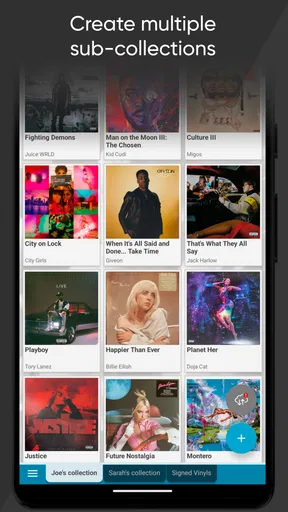
Second, I would decide in advance how I want to treat duplicates. Some collectors want one entry for every physical copy; others care mainly about unique albums. Neither approach is universally correct. If I own a standard CD and a special vinyl edition, separating them is useful. If I accidentally bought two identical copies, combining or clearly marking them may be less confusing. The important thing is to choose a rule before the collection becomes inconsistent.
Third, I would use the catalog as a buying filter rather than just an archive. Before visiting a shop, I can review gaps in a favorite artist’s discography or check whether a title is already present. This turns cataloging into a practical shopping tool. It also helps me avoid the common collector mistake of buying the same familiar album repeatedly while overlooking less obvious missing releases.
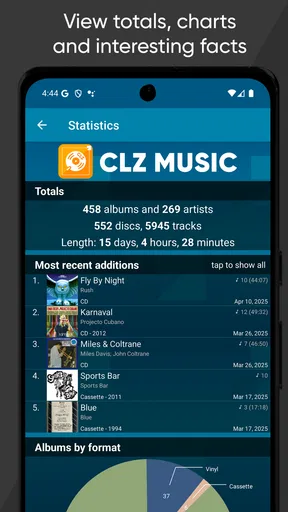
A fourth insight is that cataloging can reveal the shape of a collection. Once the library is searchable, patterns become easier to notice: artists represented by only one album, genres that dominate the shelves, or periods when buying habits changed. That can guide future purchases more thoughtfully than browsing based only on whatever catches my eye in a store.
The friction I would expect before committing
The biggest limitation is that the app cannot remove the work of handling the collection. I still need to scan, inspect, and occasionally correct items. A person with only a handful of albums may find that the setup takes longer than simply remembering what they own. The benefit grows with the size and activity of the collection.
Barcode recognition also depends on the physical release being identifiable in a useful way. Older records, unusual packaging, and items without convenient barcodes may not fit the effortless workflow suggested by the concept. I would be comfortable using the app for a mixed collection, but I would not expect every rare or obscure pressing to be cataloged with one quick scan.
There is also a cost consideration after the initial free entry point. The app is listed as free, while in-app purchases range from $0.99 to $19.99 per item, and the store summary refers to a US $20 yearly plan. That means I would check the current purchase screen carefully and decide whether the ongoing value matches how often I buy physical music. For an active collector, avoiding duplicates and maintaining a serious inventory may justify the expense; for a casual listener, it may not.
The age requirement is broad, which fits the straightforward nature of the app, but that should not be confused with universal suitability. A child who owns a few albums does not need a detailed collection manager. The intended value is clearer for adults, families, DJs, enthusiasts, and anyone whose shelves have outgrown memory.
Who benefits most from CLZ Music
I would recommend it most strongly to people who buy CDs or vinyl regularly, trade physical music with friends, or keep multiple shelves and storage boxes. It is also a good fit for someone who has inherited a collection and wants to understand what is there without beginning with a blank spreadsheet. The barcode workflow gives these users a realistic way to make progress.
It is less convincing for someone whose music life is almost entirely digital. If I stream everything and rarely purchase physical releases, a dedicated ownership catalog may become another maintenance task rather than a helpful tool. Likewise, a professional archivist with demanding metadata requirements may want a system designed around deep edition-level documentation and custom fields.
The app’s rating of 4.7 from around 3.7 thousand ratings suggests that many users find the approach effective, while more than 100 thousand installs show that it has reached a substantial audience. Those figures do not replace personal testing, but they match my impression: this is a focused tool with a clear audience, not a general music app trying to do everything.
CLZ Music was released on December 6, 2010, and the continued presence of a current version indicates a product that has remained relevant to the collection-management niche. I would not choose it because it promises a flashy listening experience. I would choose it because the simple act of scanning can turn a vague physical library into something I can search, review, and use when making everyday decisions.
My recommendation after using the cataloging approach
I see the strongest case for CLZ Music when the real problem is not finding music to play but remembering the physical music already owned. Its barcode-centered workflow reduces the most tedious part of building an inventory, and that makes the project feel manageable. The app is especially useful before shopping, while organizing shelves, and when checking whether a familiar title is already in the house.
I would begin with a single shelf and test the process on ordinary albums, then decide how much detail I want for rare editions and duplicates. That trial makes it easier to judge whether the catalog saves me time or simply adds another chore. For a growing CD or vinyl collection, I think the balance is favorable. For a small or entirely digital library, a note or spreadsheet may remain the simpler answer.
My final view is that this is a practical specialist app rather than an essential music companion for everyone. It earns its place when physical ownership matters and memory is no longer enough. If that describes you, the ability to scan albums into a structured catalog is more than a convenience: it gives your collection a reliable memory of its own.
Pros
- Scans barcodes quickly and identifies many CD and vinyl releases.
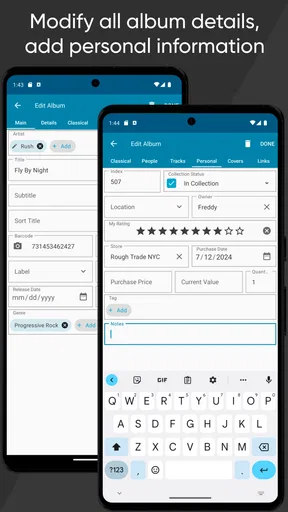
- Supports detailed cataloging of editions
- formats
- artists
- and purchase information.
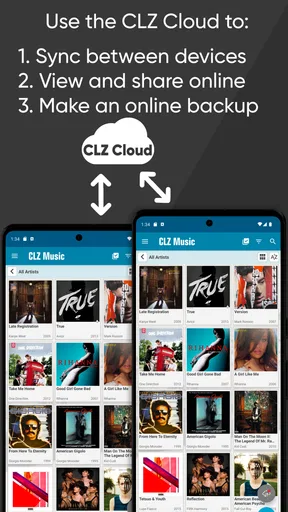
- Cloud syncing keeps your collection available across supported devices.
- Custom fields and tags make it easy to organize large music libraries.
- Useful statistics show collection size
- value
- genres
- and other trends.
Cons
- Some advanced features require a paid subscription.
- Rare or regional releases may need manual searching or editing.
- Accurate value estimates can vary widely by condition and market demand.
- Large collections may take time to scan
- review
- and organize initially.
- The interface can feel dense for users who only want a simple inventory.
FAQs for CLZ Music, CD/vinyl collection
What is CLZ Music, and what can I use it for?
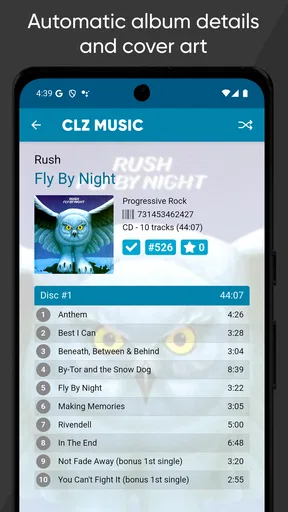
CLZ Music is a collection-management app for cataloging CDs, vinyl records, and other music releases. After testing its main features, I found it useful for creating a searchable personal music library with album details, cover art, artist information, formats, purchase data, and custom notes. It is especially helpful for collectors who want to know what they own, avoid duplicate purchases, and keep their collection organized while shopping or browsing record stores.
How do I add CDs and vinyl records to my CLZ Music collection?
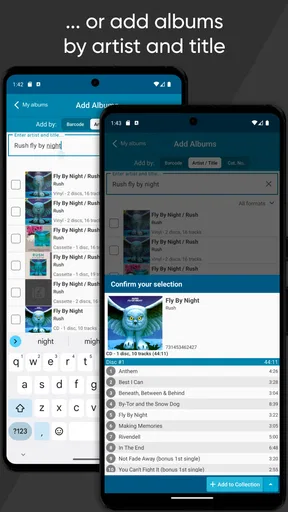
Adding music is straightforward. You can usually scan a barcode with your phone’s camera, search the online catalog by title, artist, or catalog number, and then add the matching release to your collection. The app also lets you edit details manually when a particular pressing or edition is not an exact match. This is important for vinyl collectors, because different countries, years, labels, and pressings may require careful verification before saving an item.
Does CLZ Music work with different editions, pressings, and formats?
Yes, CLZ Music is designed to handle more than simple album titles. You can record CDs, vinyl records, box sets, singles, and other releases, while distinguishing editions through information such as format, label, release year, barcode, and catalog number. In my experience, the database makes identifying releases easier, but collectors should still compare the displayed information with the physical item, particularly when dealing with rare pressings or releases that share similar barcodes.
Does CLZ Music require a subscription or an internet connection?
CLZ Music uses a subscription-based model for continued access to its full collection-management features, although availability of trials or purchase options may vary by platform and current store policy. An internet connection is generally needed when searching the CLZ database, downloading album information, synchronizing data, or retrieving cover images. Once records are saved, many collection-browsing functions can be used offline, but online access is recommended for adding and updating items.
Can I back up or synchronize my music collection across devices?
Yes, CLZ Music supports cloud synchronization through a CLZ account, allowing your collection to be backed up and accessed across compatible devices. This is one of its most valuable features because manually rebuilding a large CD or vinyl catalog would be time-consuming. Before changing phones or reinstalling the app, I recommend confirming that synchronization has completed successfully. It is also wise to keep your account credentials secure and periodically check that recent edits appear correctly.


